Reporting V2 gives Badge users a more complete way to review print and enrollment activity in one place. It helps Owners and Operators verify successful activity, investigate failed events, and better understand what happened during a print or enrollment event.
TABLE OF CONTENTS
- Why Reporting V2 Matters
- What's New in Reporting V2
- Label Print Visibility
- List Selection
- Campus-Level Visibility
- What to Know Before Requesting Access
- How to Request Access
Why Reporting V2 Matters
Reporting V2 helps districts review important Badge activity without piecing together information from multiple areas. Users can confirm whether a card printed successfully, review enrollment outcomes, identify failed prints or enrollments, and see which card or UID values were shared with connected external systems.
This added visibility can help teams troubleshoot third-party integration issues more efficiently. For example, if a card printed successfully but enrollment failed, teams can identify the failed enrollment and take next steps to re-enroll the card without reprinting it.
What's New in Reporting V2
Reporting V2 provides a clearer reporting experience for print and enrollment history in Badge. Depending on your account setup and available data, users can review details such as:
- Print events
- Enrollment events
- Combined print and enrollment activity
- Success or failure status
- User, list, layout, and record details
- Printer details when available
- Enrollment details for connected systems
- Error messages or failed outcomes
- Card or UID values shared with external systems
Reporting V2 also includes improved filters to help users narrow results by list, campus, user, date range, student, errors, reprint reason, and more.
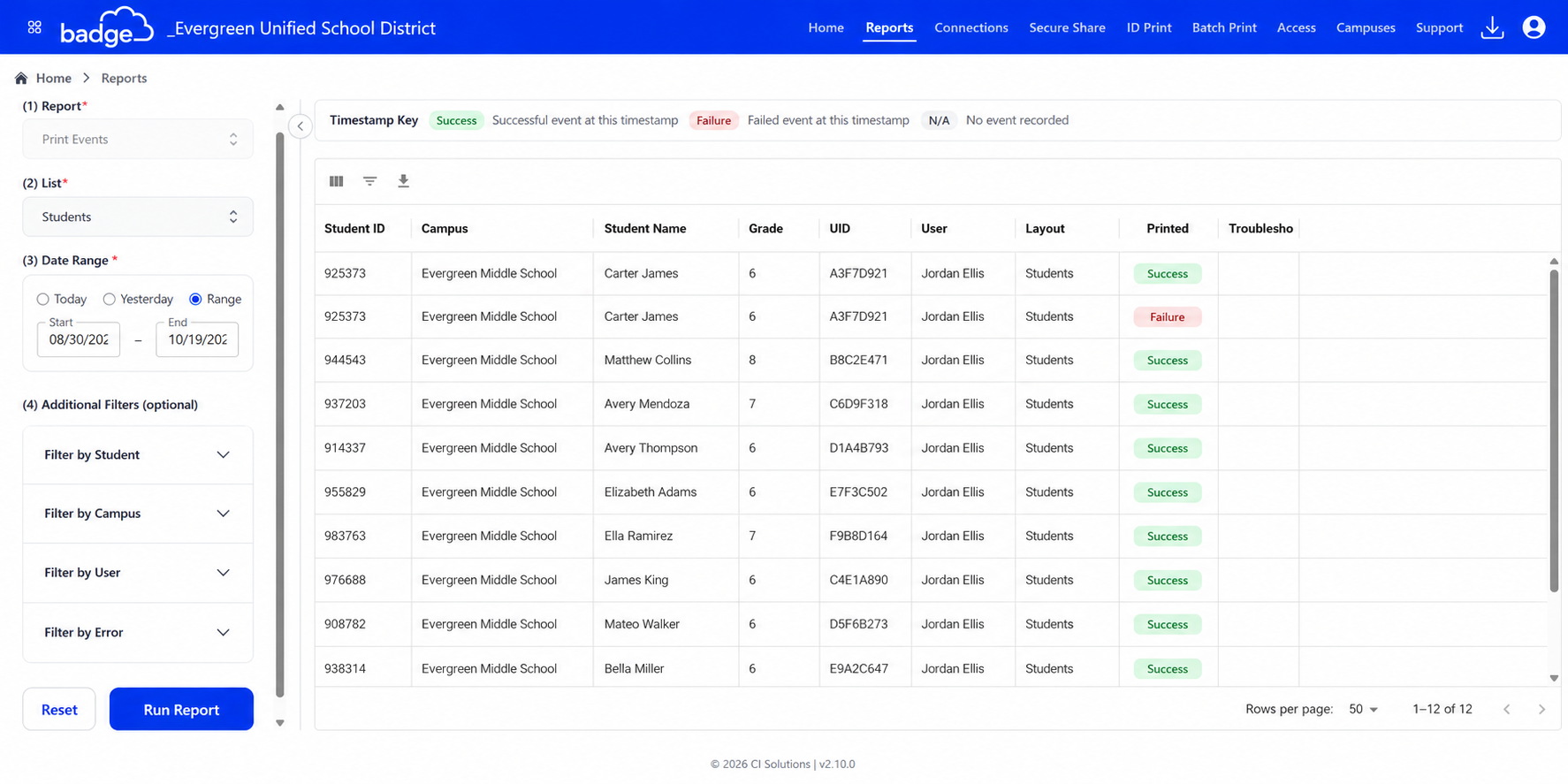
Label Print Visibility
Reporting V2 also improves visibility into temporary card or label printing activity. Previously, label prints could only be identified by manually searching for a visual indicator next to the record. With the updated reporting experience, users can filter for label print activity.
Label print information is also included in report exports, helping districts review how many temporary cards were printed and better understand which students may be using a temporary card instead of their assigned badge.
List Selection
Reporting V2 is list-based. If your account has one list, Badge may select it automatically. If your account has multiple lists, you will need to select a list before report results appear.
After selecting a list, you can apply additional filters to narrow the report results.
Campus-Level Visibility
Operator visibility in Reporting V2 is controlled by Badge ACL permissions. By default, Operators do not have access to view campus-wide activity.
If your team would like Operators to view activity for their assigned campuses, you can create a custom Role and turn on the View Activity for Assigned Campuses permission. This helps schools customize reporting access based on each user’s role and responsibilities.
What to Know Before Requesting Access
Reporting V2 works best with the most up-to-date versions of ID Print and Batch Print. Legacy print activity may not include the same level of detail because older print workflows do not track events the same way.
How to Request Access
Reporting V2 must be activated for your Badge account by request. To request access, email support@cardintegrators.com and ask to have Badge Reporting V2 activated for your account.
Was this article helpful?
That’s Great!
Thank you for your feedback
Sorry! We couldn't be helpful
Thank you for your feedback
Feedback sent
We appreciate your effort and will try to fix the article