If you are getting a notification that 'List Records Import Failed' or 'List Images Import Failed,' see below
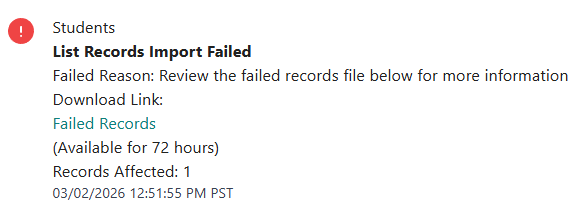 Records
General Tips:
- Ensure the Campus matches what is in Badge (Campus names are case sensitive)
- e.g. 'ABC Elementary' and 'abc elementary' will be considered different campuses
- Ensure columns have headers
- Click here to read the full article on proper formatting
Download the file and check the error reason
- Error: 'Record is assigned to an invalid campus'
Solution: Confirm if the campus is in Badge. If it is, confirm the spelling and proper case - Error: 'Record is a duplicate'
Solution: Remove the duplicate from the file, and import the records again

Images
General Tips:
- Ensure images are named by ID number
- e.g. 123456.jpg
- Ensure the record is in Badge
- Click here to read the full article on proper formatting
Example of bad formatting:
- Wrong file type
- Not named by ID

Was this article helpful?
That’s Great!
Thank you for your feedback
Sorry! We couldn't be helpful
Thank you for your feedback
Feedback sent
We appreciate your effort and will try to fix the article