Badge Owners have the authorization to delete campuses. CI Solutions does not have the authority to delete campuses to account.- If you are unsure who are the Badge Owners, contact us or your team members for account information.
- A Campus cannot be deleted if there are any records with that specific campus assigned to it.
Delete Campus
1. Click Campuses on the left side navigation bar

2. Find the campus you want to delete > Click on the checkbox next to the Campus' name
- The campus entire row should be highlighted in red.
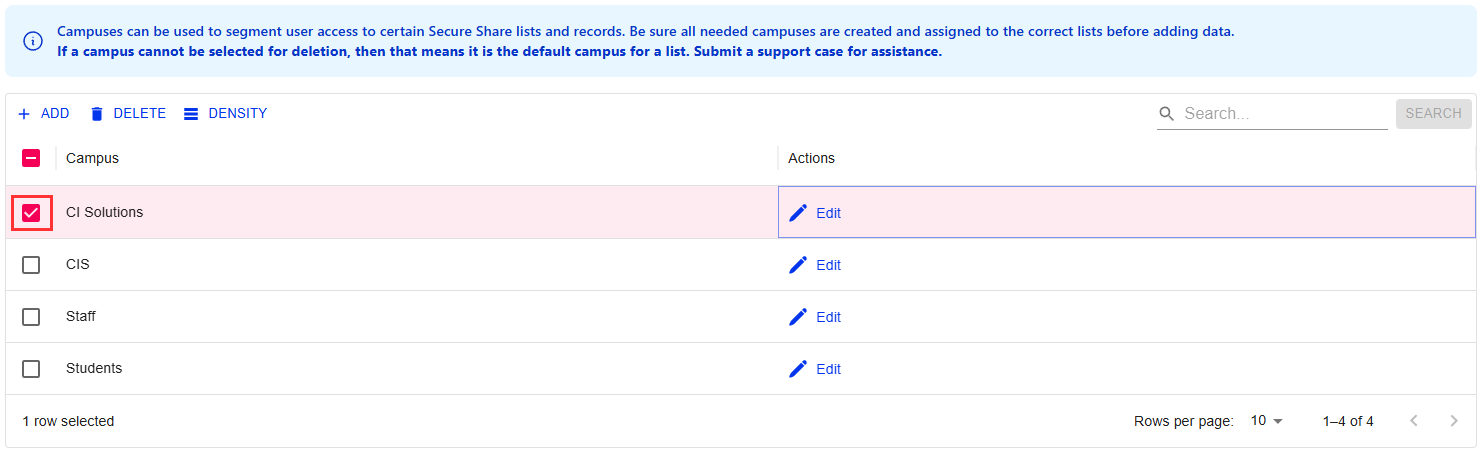
3. Click on the trash bin icon above the list to delete
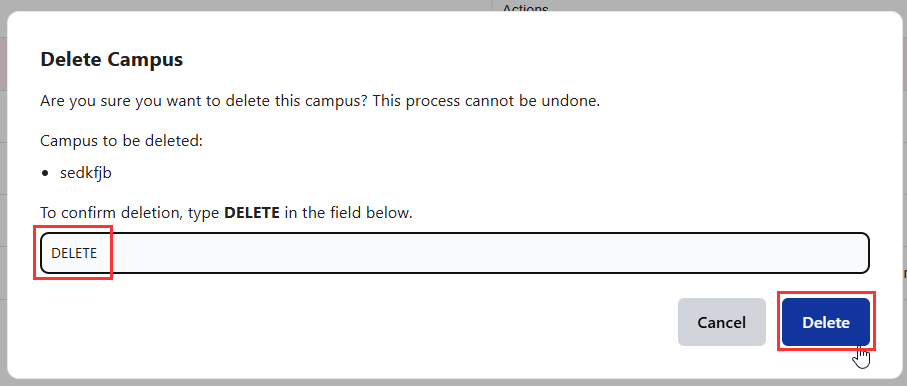
4. You will need to type 'DELETE' to confirm you want to delete the campus. Confirm you want to delete the campus and click Delete
- Typing 'DELETE' prevents accidental deletions of important information
Was this article helpful?
That’s Great!
Thank you for your feedback
Sorry! We couldn't be helpful
Thank you for your feedback
Feedback sent
We appreciate your effort and will try to fix the article